Calculating fault permeability
With the Fault Permeability form (model > Fault Seal > Fault Seal Modeling > Fault Permeability) you calculate the fault permeability based on clay content in the fault zones as calculated with the Fault Clay Content form (previous step of the workflow). Fault permeability is input to the fault transmissibility calculation, see Calculating fault transmissibility.
You can choose from three methods to calculate fault permeability. Two of these are deterministic methods based on laboratory measurements of clay content - permeability relationships in real reservoir faults, and analysis and numerical modeling of field production data (after Jolley et al. 2007 and Manzocchi et al. 2008). In the model, fault permeability is calculated by using the fault clay content calculated from SGR and/or SSF as a proxy for the clay in the clay-permeability relations published by these authors.
- If you have a production history, you can compare and select a similar production history case and associated fault clay content - fault permeability relationship published by Manzocchi et al. (2008), see Manzocchi et al. (2008).
- Alternatively, you can use a fault clay content - permeability relation, based on laboratory measurements of real reservoir faults from Jolley et al. (2007). This method provides you with various pre-defined fault clay content - fault permeability relationships that are grouped according to burial history and compaction in the reservoir. You can also make your own 'custom' curve, see Jolley et al. (2007).
With the third method available on the Fault Permeability form you can directly assign permeability values to the 'continuous' and 'discontinuous' categories of clay content property 'SSF categorical. In order to use this method, you need to have calculated this property with method 'Clay smearing (SSF)' on the Fault Clay Content form (for an overview of all possible clay content properties, see step 5 in Calculating fault clay content).
To calculate fault permeability
- In the Model drop-down list at the top of the form, select the relevant Fault Seal Model.
-
Clay Content Here you select the input clay content property for the fault permeability calculation. Depending on the method(s) you selected on the Fault Clay Content form, all clay content properties which have clay content as a fraction (between 0 and 1) plus property 'SSF categorical' are available for selection.
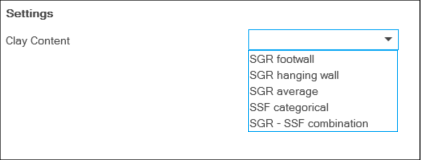

Before you make your selection be aware that:
- Clay content properties 'SGR average', 'SGR hanging wall', 'SGR footwall' and 'SGR - SSF combination' are eligible for permeability calculation with Jolley et al. or Manzocchi et al. methods.
- When you select property 'SSF categorical', you can directly assign a permeability value to either category (i.e. 'continuous' and 'discontinuous') contained in this property (see SSF categorical on how this property was calculated).
Select the clay content property of your choice from the drop-down box.
- (In case you chose 'SSF categorical' under step 2, continue reading under 'B - Direct assign of permeability', in all other cases continue reading under 'A - Assigning a function').
- Type Select an empirical relation after Jolley et al. (2007) or select 'Custom' if you want to create your own 'clay content - permeability' function (see Jolley et al.). The selected function is shown in blue against the backdrop of the other functions (in gray) on the right side of the form.
- Position coefficient 'a' (Only when you chose 'Custom') Enter the position coefficient. The unit for 'a' is mD. Higher values for 'a' result in a higher overall permeability (move the curve 'up').
- Curvature coefficient 'b' (Only when you chose 'Custom') Enter the curvature coefficient. Higher values for 'b' results in greater relative effect of clay fraction on permeability.
- Maximum fault permeability You should set a clipping limit to the output fault permeability (this is usually set as equivalent to the upper bound on reservoir sand permeability). This value is applied to all calculation points where calculated permeability is higher than this value. This is needed because very low clay fraction can lead to artificially high to infinite permeability values being calculated, where the fault rocks should have permeability equivalent to pure sand in the reservoir model.
- Type Select one of the four production history cases that is similar to your reservoir (see Manzocchi et al.). The selected function is shown in blue against the backdrop of the other functions (in gray) on the right side of the form.
- Maximum fault permeability You can optionally set a clipping limit to the output fault permeability, equivalent to the upper bound on clean reservoir sand permeability.
- Permeability for continuous smear Enter a permeability value, using available fault clay-permeability data as a guide (e.g. the clay-rich data in Jolley et al. 2007 supplied here). This value will be assigned to all 'continuous' calculation points in property 'SSF categorical'. This value should be chosen to seal the fault smear to flow, or make it an extremely strong baffle.
- Permeability for discontinuous smear There are several ways of assigning permeability between continuous smears: (i) If you check the box, you can optionally assign a permeability value to the 'discontinuous' calculation points in property 'SSF categorical'. You can use available fault clay - permeability data as a guide (e.g. the clay-rich data in Jolley et al. 2007 supplied here). To do this, check the box and enter the permeability value in the entry field. (ii) If you do not assign a permeability, these points remain 'undefined'. 'Undefined' assumes that the grid cell connection of the two cells across the fault is open, with no permeability reduction due to fault gouge (in other words the transmissibility (multiplier) calculation for these connections is controlled by the permeability of the two grid cells). (iii) The undefined permeabilities in the discontinuous smear zones can, however, be overwritten by SGR-calculated fault permeability values. This can be done with method 3 'Clay mixing, Clay smearing' (SGR- SSF combination) in the previous step of the workflow, as described in Calculating fault clay content.
- At the base of the form, click Apply to calculate permeability and keep the form open or OK to calculate permeability and move to the next step of the workflow, Calculating fault thickness. The output property 'Fault permeability' (this is generic permeability with property type 'Permeability') is added to the respective point set(s) in the 'Fault Seal' surface set in the JewelExplorer. You can visualize the property in the 3D View.
Method From the drop-down list, select Jolley et al. 2007 or Manzocchi et al. 2008. For information about these methods, see Fault permeability calculation methods. Depending on your choice, continue reading under the relevant section, i.e. 'A1 - Jolley et al.' or 'A2 - Manzocchi et al.':
A1 - Jolley et al. (2007)
Continue reading under step 4 below.
A2 - Manzocchi et al. (2008)
Continue reading under step 4 below.
 B - Direct assign of permeability (property 'SSF categorical')
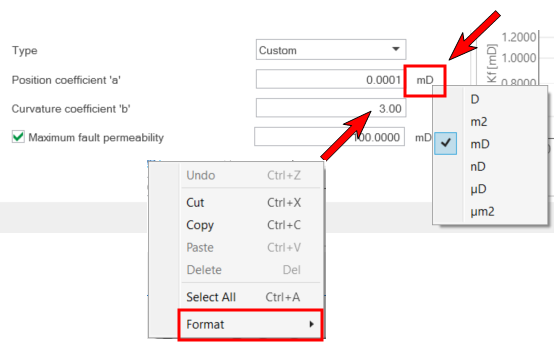
Right-mouse click on the unit behind an entry field, or in a numerical entry field, to change the unit or format (nr. of digits) respectively. This will update the display unit and format in the 3D View. click to enlarge